ACTIVEDONORACTIVEDONOR
  • ActiveDonor
  • Training
  • Sign Up
  • Contact Us
  • ActiveDonor
  • Training
  • Sign Up
  • Contact Us
home/Knowledge Base/Projects/Archiving projects

Archiving projects

41 views 0

Once a project is completed, or if you are no longer fundraising for a specific cause, you may choose to Archive a project. 

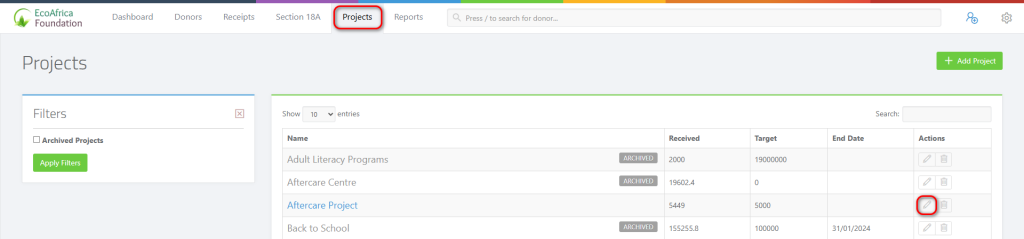
Visit the Projects page via the main menu bar.

For the project you wish to delete click on the Edit button (pencil icon) in the right column.
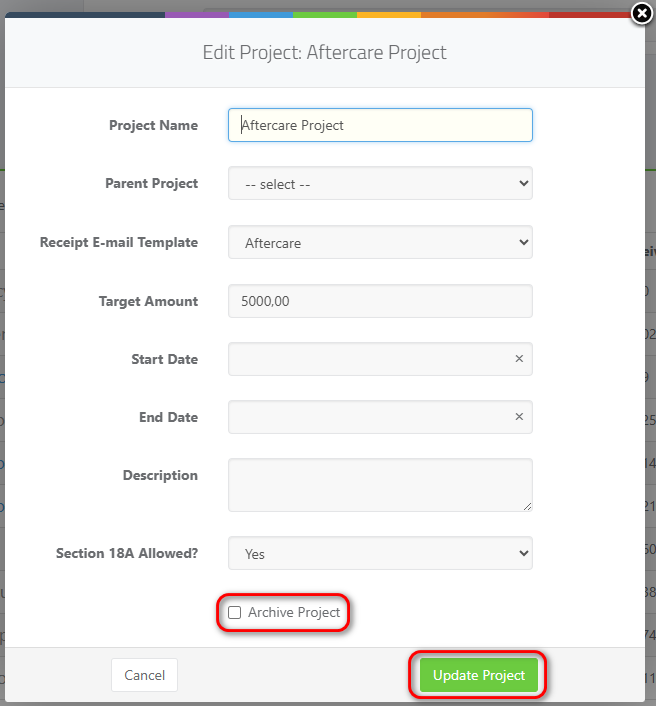
Select the Archive Project checkbox in the project editor popup window:
Was this helpful?

Yes  No
Related Articles
  • Document Attachments
  • Tracking Project Fundraising
  • Editing a project
  • Deleting Projects
  • Adding a new project

Didn't find your answer? Contact Us

Projects
  • Archiving projects
  • Document Attachments
  • Tracking Project Fundraising
  • Editing a project
  • Deleting Projects
  • Adding a new project
KB Categories
  • Donors
  • Mobile App
  • Projects
  • Receipting
  • Reminders
  • Reports
  • Section 18A Certificates
  • Settings
  • Subscription
  • Users
Projects
  • Archiving projects
  • Adding a new project
  • Editing a project
  • Deleting Projects
  • Tracking Project Fundraising
  • Document Attachments
All Categories
  • Donors
  • Mobile App
  • Projects
  • Receipting
  • Reminders
  • Reports
  • Section 18A Certificates
  • Settings
  • Subscription
  • Users

  Adding a new project

Editing a project  

  • Privacy Policy
  • Terms of Use
  • Copyright 2023 ActiveDonor.com. All Rights Reserved.