Correcting invalid donor identifiers (company registration, trust, ID and tax/PBO numbers)
In short: A donor's identifying number must be captured in the exact format SARS expects, or ActiveDonor refuses to save the donor's tax details and a Section 18A certificate for that donor can't go on an IT3(d) file. Open the donor, fix the value the red error names (SA ID = 13 digits + checksum; company/CC/NPC reg = CCYY/NNNNNN/NN; tax number = 10 digits starting 0/1/2/3/9 + checksum), and save.
Overview
Each donor type has its own format rule. If a number doesn't match, the save is blocked and a red error appears next to the field. This article gives, for each identifier, the exact accepted format, a valid and an invalid worked example, and the precise on-screen error message, so you can recognise and fix any rejected value.
Key terms used below:
- SA ID number — a 13-digit South African identity number.
- Company registration number — the CIPC registration number in the form
CCYY/NNNNNN/NN(year / 6-digit sequence / 2-digit type code). - Trust number / IT number — the Master of the High Court reference for a trust (often shown as
IT.../...). ActiveDonor stores this in the same registration-number field. - Income tax reference number — the donor's 10-digit SARS income tax number. Where the donor is a registered Public Benefit Organisation, this is also its PBO number (PBO = Public Benefit Organisation).
- IT3(d) — the electronic data file ActiveDonor builds for SARS declaring the Section 18A certificates you have issued.
Before you start
You'll need:
- The Manage Donors permission to edit a donor's tax and ID details.
- To know that identifiers are validated in several places — when you save tax/ID information on a donor, when you add or edit a donor with Section 18A details, when a donor submits an update through a public update link, and again as a compliance check just before an IT3(d) submission is generated. The same rules apply in every case, so fixing the value on the donor fixes it everywhere.
📌 Note: For an individual donor, ID validation depends on three linked fields: Donor Type, Identity Type (ID or Passport) and Country of Issue. The strict 13-digit SA ID check only runs when Donor Type is Individual, Identity Type is ID, and Country of Issue is South Africa.
Fixing a rejected identifier (the general steps)
Step 1: Open the donor
In the top navigation bar, click Donors and open the donor you need to fix.
Step 2: Open the tax/ID information panel
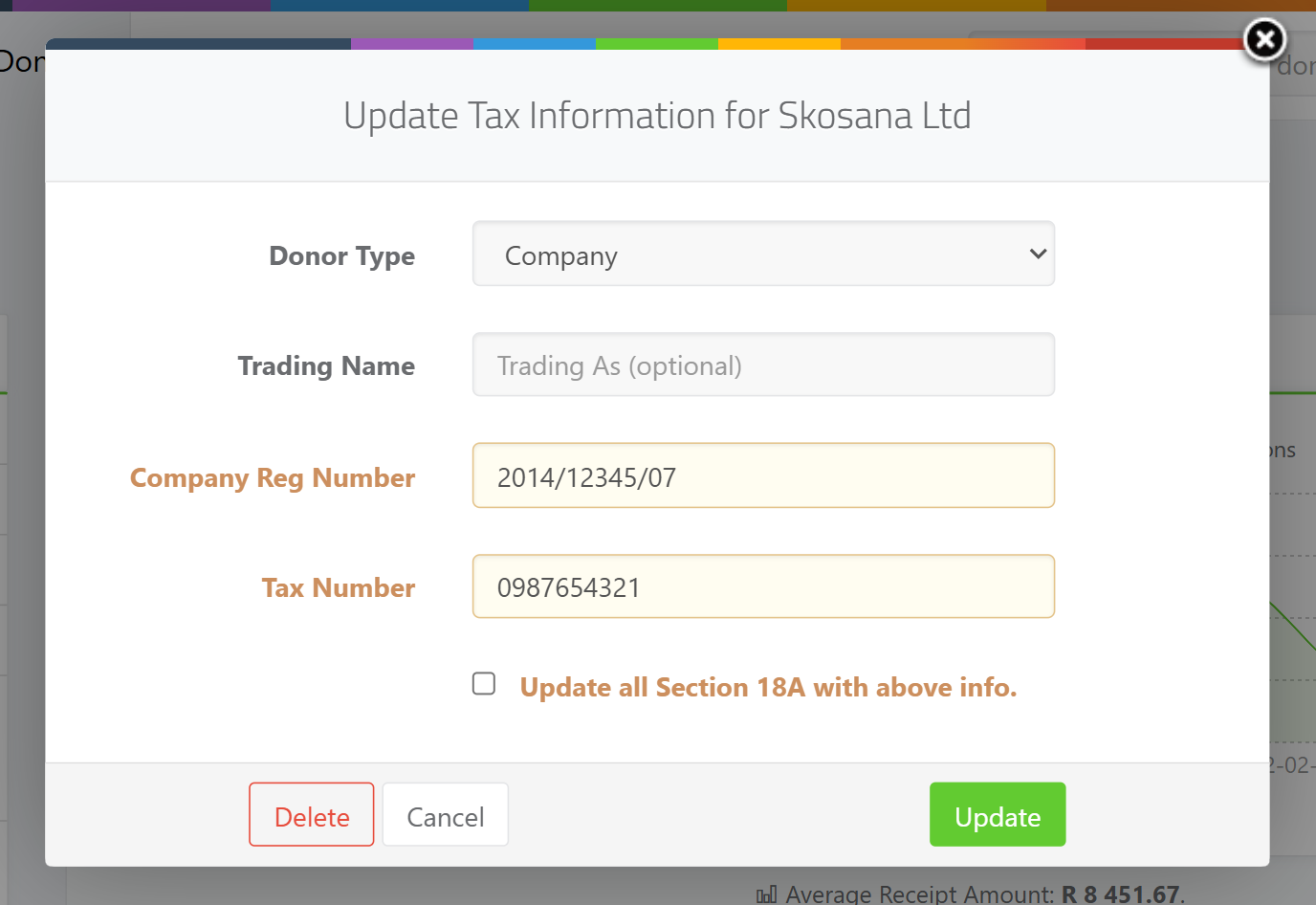
On the donor's page, open the tax/ID information panel. If the donor has no tax details yet the panel is headed Add Tax Information for {donor name}; if details already exist it is headed Update Tax Information for {donor name}.
Step 3: Correct the value the error names
Correct the value in the field that failed. The registration field's label changes with the donor: for an individual it reads ID Number or Passport Number (matching the chosen Identity Type), and for an entity it reads {type} Reg Number (for example Company Reg Number or Trust Reg Number). The income-tax field is always labelled Tax Number.
Step 4: Flow the fix to existing certificates (optional)
If you want the corrected values to flow onto any certificates already issued to this donor, tick Update all Section 18A with above info. before saving.
Step 5: Save
Click Save (or Update). On success you'll see the confirmation Donor tax info has been udpated. If a value is still invalid, the matching red error message (listed below) appears next to the field and the record is not saved.
Fixing a South African ID number (Individual donors)
ActiveDonor applies the strict South African ID check only when the Donor Type is Individual, the Identity Type is ID, and the Country of Issue is South Africa. The number must be:
- exactly 13 digits, all numeric;
- have a valid birth month in positions 3-4 (01-12);
- have a valid birth day in positions 5-6 (01-31); and
- pass the Luhn checksum (the standard digit-check used on ID and card numbers).
Worked examples:
- Valid:
8001015009087(13 digits, month01, day01, passes the checksum). - Invalid:
8205195569180(13 digits but fails the checksum). The error is Invalid ID Number: The provided South African ID number is not valid.
How to fix: re-type the number carefully from the donor's ID document; a single transposed digit fails the checksum. If the donor is not South African, do not force their foreign number into the ID field — instead change Identity Type to Passport and set Country of Issue to the correct country (see the next section).
ID-versus-Passport mismatches
The Identity Type and Country of Issue must agree, or the save is blocked with one of these messages:
- Country of Issue is not South Africa but Identity Type is still
ID: Please select Passport for non-South Africans. - Identity Type is
Passportbut Country of Issue is South Africa: Please select ID for South African donors. - Identity Type was left as the placeholder
ID/Passport: Please specify the donor's ID. - Identity Type left blank on an individual: Please specify an identification type for individual donors.
- Country of Issue left blank on an individual: Please specify the country of issue for the donor's identification document.
A Passport number is not format-checked (no length or checksum rule), so any non-empty passport value is accepted once Identity Type is Passport and Country of Issue is a non-South-African country.
Fixing a company registration number (Company, Company (Public), CC, NPC)
When the donor type is Company, Company (Public), CC or NPC, the registration number must match the CIPC pattern CCYY/NNNNNN/NN, validated part by part after splitting on the two / characters:
- exactly three parts separated by
/; - part 1 (year) is 4 characters, and as a number must be between 1800 and the current year;
- part 2 (sequence) is 6 characters (a number from 000000 to 999999);
- part 3 (type) is 2 characters and must be one of:
06,07,08,10,11,21,22,23,24,25,26,30,31.
Worked examples:
- Valid:
2015/123456/07(4-digit year within range, 6-digit sequence, type07). - Invalid:
2015/12345/07(the sequence is only 5 digits) — or any value with the wrong number of slashes, a future year, or a type code not in the list above. The error is Invalid Registration Number: Format should be CCYY/NNNNNN/MM.
How to fix: copy the registration number exactly as it appears on the CIPC registration certificate, keeping the slashes and all leading zeros (for example a sequence of 001234 must keep its zeros to be 6 characters). The on-screen error abbreviates the type segment as MM; the accepted type codes are the specific two-digit values listed above, not any two digits.
📌 Note about "CK" Close Corporation numbers: Older Close Corporations were registered with numbers like
CK1990/012345/23. ActiveDonor's check splits on/and validates the three parts above — it does not specifically accept or strip a leadingCK. For a CC donor, capture the registration number in theCCYY/NNNNNN/NNform (the23type code maps to "Close Corporation" for SARS). If your CC number begins withCK, remove theCKprefix and enter theyear/sequence/typeportion so it matches the pattern.
Fixing a trust number (Trust donors) and Association / Estate
ActiveDonor does not enforce a fixed format on the registration number for Trust donors (nor for Association donors). The trust's Master's Office / IT number is stored in the same Trust Reg Number field, but any non-empty text is accepted there — the strict pattern checks only run for Individual SA IDs and for Company / Company (Public) / CC / NPC registration numbers. So a trust number is not rejected for its format; capture it as it appears on the trust's letter of authority (commonly in the IT.../... form). The field is still required when you are saving tax details for a certificate, so leaving it blank fails with An ID / Passport or registration number is required for Section 18A.
For an Estate donor the donor is treated as a person (first and last name) but, unlike an Individual, no ID-number format check is applied to the registration field; supply the estate/ID reference as text.
Fixing the income tax (and PBO) number
The income-tax reference number applies to every donor type that claims a Section 18A certificate. It must be:
- exactly 10 digits;
- start with 0, 1, 2, 3 or 9;
- pass the Luhn checksum; and
- not be all zeros.
Worked examples:
- Valid:
0542885645(10 digits, starts with0, passes the checksum). - Invalid:
1234567890(10 digits and a valid starting digit, but fails the checksum) — produces Invalid Income tax number: Failed validation check.
The tax number gives a different message depending on what is wrong, so the message tells you exactly what to correct:
- Not exactly 10 digits: Invalid Income tax number: Must be exactly 10 digits.
- Does not start with 0, 1, 2, 3 or 9: Invalid Income tax number: Must start with 0, 1, 2, 3 or 9.
- Fails the checksum: Invalid Income tax number: Failed validation check.
- Entered as
0000000000: Invalid Income tax number: Cannot be all zeros.
How to fix: enter the 10-digit number from the SARS notice of registration. Do not add spaces, dashes or the entity name. If the donor is a registered PBO, its PBO number is the same income-tax reference number captured here. The tax number is optional when simply storing donor tax details, but becomes required the moment the donor needs a Section 18A certificate; if it's missing at that point the save fails with An Income tax number is required for Section 18A.
⚠️ Foreign / non-SA tax numbers: This check is for South African SARS tax reference numbers only. A foreign tax number (for example a German one) that isn't 10 digits starting with 0/1/2/3/9 and passing the Luhn check will be rejected with one of the messages above — the field doesn't accept other countries' formats. A donor needs a valid SA income-tax number to be issued a Section 18A certificate that can be declared to SARS.
Fixing the PBO / Exemption Reference Number (IT3(d) settings)
The PBO number captured on a donor is the donor's 10-digit income-tax number described above. There is a separate field — your charity's own Exemption Reference (PBO Number) in IT3(d) settings under the Reporting Entity details — which is validated differently:
- it must be exactly 9 digits, no spaces, dashes or other characters; and
- it cannot be
000000000.
Messages:
- Wrong length or contains non-digits: Exemption Reference (PBO Number) must be 9 digits long (no spaces, dashes or other characters).
- Entered as all zeros: Exemption Reference (PBO Number) cannot be 000000000.
How to fix: enter your charity's 9-digit PBO/exemption reference exactly, with no spaces or dashes. If your value is 10 digits, that is the income-tax number, not the 9-digit exemption reference — check your SARS PBO approval letter for the correct 9-digit reference. See IT3(d) settings: Submitting Entity vs Reporting Entity.
Fixing a phone number that won't save
A donor phone number must match the pattern 0 followed by 9 more digits (a 10-digit South African number starting with 0). If it doesn't, the save is blocked with Phone format should be 0XXXXXXXXX.
How to fix: enter the number as 0XXXXXXXXX with no spaces, brackets or dashes — for example 0211234567, not 021 123 4567 or (021) 123-4567. Spaces and punctuation are the most common reason a phone number won't save. Drop any +27 country code and start with 0.
📌 Note: The Reporting Entity telephone and cellphone fields in IT3(d) settings use a slightly wider rule —
0followed by 9 to 15 digits — but the same "no spaces or punctuation, start with 0" guidance applies.
When an identifier blocks an IT3(d) submission
Just before you generate the IT3(d) file for SARS, ActiveDonor re-runs these same identifier checks against every selected certificate (a "compliance check"). A certificate whose ID/registration number, tax number, identity type or donor type is missing or malformed is flagged as non-compliant and held back from the file so SARS can't reject it. A donor type that is left blank or kept as the generic "Entity" (rather than a specific type) is also treated as non-compliant. The fix is the same: open the affected donor, correct the failing identifier shown by the message above, set a specific donor type, and (so the correction reaches the certificate) tick Update all Section 18A with above info. when saving — or regenerate the certificate. For the broader SARS-response error workflow, see Fixing IT3(d) submission errors.
Field reference
| Identifier | Accepted format | Valid example | Invalid example | Common error message |
|---|---|---|---|---|
| SA ID number (Individual, Identity Type = ID, Country = South Africa) | 13 digits, valid month (01-12) and day (01-31), passes Luhn checksum | 8001015009087 |
8205195569180 (fails checksum) |
Invalid ID Number: The provided South African ID number is not valid. |
| Passport (Individual, non-South African) | Any non-empty value; no length/checksum check | A01234567 |
(blank) | An ID / Passport or registration number is required for Section 18A |
| Company / Company (Public) / CC / NPC registration number | CCYY/NNNNNN/NN — year 1800-current (4 chars), 6-digit sequence, type one of 06,07,08,10,11,21,22,23,24,25,26,30,31 |
2015/123456/07 |
2015/12345/07 (5-digit sequence) |
Invalid Registration Number: Format should be CCYY/NNNNNN/MM. |
| Trust / Association registration (IT number) | Free text; no fixed format enforced, but required for Section 18A | IT1234/2015 |
(blank) | An ID / Passport or registration number is required for Section 18A |
| Income tax / PBO number (on the donor) | Exactly 10 digits, starts 0/1/2/3/9, passes Luhn, not all zeros | 0542885645 |
1234567890 (fails checksum) |
Invalid Income tax number: Failed validation check. |
| Exemption Reference (PBO Number) — charity, IT3(d) settings | Exactly 9 digits, no spaces/dashes, not 000000000 | 930012345 |
9300123456 (10 digits) |
Exemption Reference (PBO Number) must be 9 digits long (no spaces, dashes or other characters) |
| Donor phone number | 0 followed by 9 more digits, no spaces or punctuation |
0211234567 |
021 123 4567 (spaces) |
Phone format should be 0XXXXXXXXX |
Common issues & solutions
| What you see | What it means | How to fix it |
|---|---|---|
| Invalid ID Number: The provided South African ID number is not valid. | The 13-digit SA ID is the wrong length, has a bad birth month/day, or fails the Luhn checksum. | Re-type the ID exactly from the document. If the donor isn't South African, switch Identity Type to Passport and set the correct Country of Issue. |
| Invalid Registration Number: Format should be CCYY/NNNNNN/MM. | A Company/CC/NPC reg number doesn't match CCYY/NNNNNN/NN (wrong slashes, year out of 1800–current range, sequence not 6 digits, or type code not in the allowed list). |
Copy it exactly from the CIPC certificate, keeping slashes and leading zeros. Drop any CK prefix on old CC numbers and enter the year/sequence/type portion. |
| Please select Passport for non-South Africans | Country of Issue isn't South Africa but Identity Type is still ID. |
Set Identity Type to Passport. |
| Please select ID for South African donors. | Identity Type is Passport but Country of Issue is South Africa. |
Set Identity Type to ID (or correct the Country of Issue). |
| Please specify the donor's ID | Identity Type is still the placeholder ID/Passport. |
Choose ID or Passport. |
| Please specify an identification type for individual donors | Identity Type is blank on an individual. | Choose ID or Passport. |
| Please specify the country of issue for the donor's identification document | Country of Issue is blank on an individual. | Select the country that issued the ID/passport. |
| Invalid Income tax number: Must be exactly 10 digits. | The tax number isn't 10 digits (often a foreign number or one with spaces). | Enter the 10-digit SA SARS tax reference with no spaces or dashes. |
| Invalid Income tax number: Must start with 0, 1, 2, 3 or 9. | The tax number starts with another digit. | Check it against the SARS notice of registration; SA tax numbers start with 0, 1, 2, 3 or 9. |
| Invalid Income tax number: Failed validation check. | The tax number is 10 digits and starts correctly but fails the Luhn checksum. | Re-type it carefully; a single wrong digit fails the check. |
| Invalid Income tax number: Cannot be all zeros. | The tax number was entered as 0000000000. |
Enter the real 10-digit SARS tax number. |
| An Income tax number is required for Section 18A | The tax number is blank but the donor needs a certificate. | Add the donor's 10-digit SA tax number. |
| An ID / Passport or registration number is required for Section 18A | The ID/registration field is blank but the donor needs a certificate. | Add the donor's ID, passport or registration number. |
| Exemption Reference (PBO Number) must be 9 digits long (no spaces, dashes or other characters) | Your charity's exemption reference in IT3(d) settings isn't exactly 9 digits. | Enter the 9-digit PBO/exemption reference from your SARS PBO approval letter, no spaces or dashes. A 10-digit value is the tax number, not the exemption reference. |
| Phone format should be 0XXXXXXXXX | The phone number has spaces/punctuation or doesn't start with 0. | Enter it as 0XXXXXXXXX with no spaces, brackets or dashes; drop any +27. |
FAQ
Is this a valid tax number? A valid SA SARS income-tax number is exactly 10 digits, starts with 0, 1, 2, 3 or 9, passes the Luhn checksum, and isn't all zeros — see How do I fix an "invalid tax number" when issuing a Section 18A? for the fix steps.
Why is my German / foreign tax number rejected? The check only accepts South African SARS tax reference numbers (10 digits, starting 0/1/2/3/9, Luhn-valid). Foreign tax numbers in other formats are rejected. A donor needs a valid SA tax number to be declared on an IT3(d) file.
What format is a company registration number?
CCYY/NNNNNN/NN — a 4-digit year (1800 to the current year), a 6-digit sequence, and a 2-digit type code from the allowed list. Example: 2015/123456/07. Keep the slashes and any leading zeros. See How do I fix an "invalid ID or registration number" on a donor? for the fix steps.
My CC number starts with CK — is that valid?
Remove the CK and enter the year/sequence/type portion (the 23 type code corresponds to a Close Corporation) — see How do I fix an "invalid ID or registration number" on a donor?. If you have only a CK-prefixed number, contact support before forcing it in.
Why won't my donor's phone number save?
It almost always has spaces, brackets or dashes, or doesn't start with 0. Enter it as 0XXXXXXXXX with digits only. The message is Phone format should be 0XXXXXXXXX.
What's the difference between the PBO number on a donor and the Exemption Reference Number in settings? The donor's PBO number is their 10-digit income-tax number. Your charity's own Exemption Reference (PBO Number) in IT3(d) settings is a separate 9-digit value from your SARS PBO approval letter.
Do I have to fix the certificate too, or just the donor? Fix it on the donor, then tick Update all Section 18A with above info. when saving so the correction flows to certificates already issued — or regenerate the certificate.
Related
- How do I fix an "invalid tax number" when issuing a Section 18A?
- How do I fix an "invalid ID or registration number" on a donor?
- Adding tax and ID information to a donor
- Adding a donor (types and required fields)
- Donor types explained
- Section 18A eligibility and required donor tax details
- IT3(d) settings: Submitting Entity vs Reporting Entity
- Fixing IT3(d) submission errors
Need a hand?
If a value looks correct on the donor's document but ActiveDonor still rejects it, copy the exact red error message and the value you entered (mask the last few digits) and contact ActiveDonor support — the message tells us exactly which rule is failing.