Adding tax and ID information to a donor
In short: On the donor's profile, click + Add Tax Info (or Modify Tax Info if details exist) in the Tax Information panel, enter the donor's ID or registration number and SARS tax number, and Save. You need the Manage Donors permission. These details are the donor's — your organisation's own PBO/tax number is set separately in settings.
Overview
To issue a valid Section 18A certificate (a tax certificate that lets a South African donor claim a SARS deduction) you need the donor's identity or registration number and, ideally, their SARS tax number. This article explains how to capture and update that information and which formats ActiveDonor accepts.
📌 Note: This is the donor's tax and ID information, stored on the donor. Your own organisation's SARS tax number, PBO/Exemption Reference Number and registration details are configured in your settings, not here.
Before you start
You'll need:
- The Manage Donors permission.
- The right identity field for the donor's type: individuals and estates use an ID or Passport number; companies, close corporations, trusts and other entities use a registration number. See Donor types explained.
⚠️ Important: ActiveDonor validates these numbers, so enter them exactly. An invalid ID, registration number or tax number is rejected on save.
Adding tax info
Step 1: Open the Tax Information window
On the donor's profile, find the Tax Information panel on the left. If no tax details exist yet, click + Add Tax Info. If details already exist, click Modify Tax Info. The window opens titled Add Tax Information (or Update Tax Information) for that donor.
Step 2: Complete the fields
- For entities, confirm the Donor Type dropdown.
- For individuals, choose an Identity Type (ID or Passport) and a Country of Issue.
- Enter the ID / Reg Number (this is required to save).
- Enter the Tax Number — the donor's SARS tax reference number.
- For entities, optionally enter a Trading Name (trading-as name).
Step 3: Update certificates (optional)
If the donor already has Section 18A certificates, tick Update all Section 18A with above info. to copy the new tax details onto them.
Step 4: Save
Click Save (or Update). To remove tax info entirely, use the Delete button in this window.
You can also enter these details in the Tax Information section of the main donor form when adding or editing a donor.
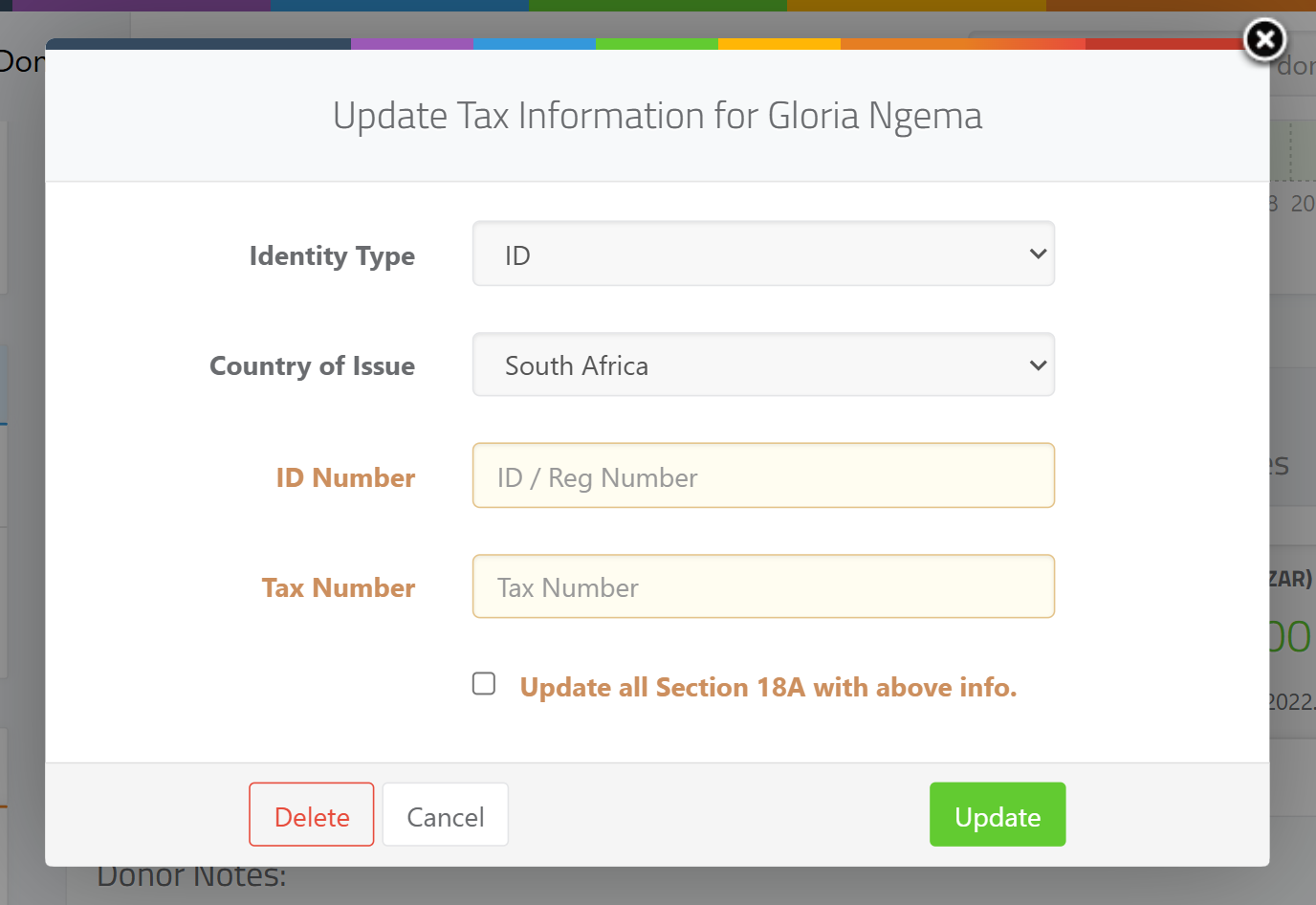
Accepted formats
ActiveDonor checks identity and tax numbers before saving:
- South African ID number — must be 13 digits and pass the standard ID checksum (and the month/day in the ID must be valid). An invalid ID shows "Invalid ID Number: The provided South African ID number is not valid."
- Company / entity registration number — must follow the South African format CCYY/NNNNNN/MM (for example
2015/123456/07). A wrong format shows "Invalid Registration Number: Format should be CCYY/NNNNNN/MM." The two-digit company-type code must be one of: 06, 07, 08, 10, 11, 21, 22, 23, 24, 25, 26, 30, 31, and the year must be 1800–this year. - SARS tax number — must be exactly 10 digits, start with 0, 1, 2, 3 or 9, pass the checksum, and not be all zeros. Failing values show messages such as "Invalid Income tax number: Must be exactly 10 digits.", "Invalid Income tax number: Must start with 0, 1, 2, 3 or 9.", "Invalid Income tax number: Cannot be all zeros." or "Invalid Income tax number: Failed validation check."
- ID Type and nationality — a South African donor must use ID ("Please select ID for South African donors.") and a non-South African donor must use Passport ("Please select Passport for non-South Africans").
How tax info shows on the profile
The Tax Information panel shows the donor's type as a badge and indicates whether the Tax Number and the ID/registration number are 🟢 Available or 🟡 Missing. For individuals it also shows the Country of Issue. The registration line is labelled by type — for example "Trust Number", "CC Number" or "Company Number", and "ID Number" or "Passport Number" for individuals.
Field reference
| Field | Required? | Notes |
|---|---|---|
| Donor Type | Yes (entities) | Company, Company (Public), CC, NPC, Trust or Association. |
| Identity Type | Yes for individuals | ID or Passport. |
| Country of Issue | Yes for individuals | The issuing country. |
| ID / Reg Number | Required to save tax info | SA ID = 13 valid digits; entity = CCYY/NNNNNN/MM. |
| Tax Number | Optional, but needed for SARS reporting | 10 digits, starts with 0/1/2/3/9, valid checksum, not all zeros. |
| Trading Name | Optional (entities) | Trading-as name. |
| Update all Section 18A with above info. | Optional checkbox | Copies details onto existing certificates. |
Common issues & solutions
| What you see | What it means | How to fix it |
|---|---|---|
| "Invalid Registration Number: Format should be CCYY/NNNNNN/MM." | The entity registration number is the wrong format. | Re-enter as CCYY/NNNNNN/MM, e.g. 2015/123456/07. |
| "Invalid ID Number: The provided South African ID number is not valid." | A South African ID isn't 13 valid digits / fails the checksum. | Re-check every digit; SA IDs are 13 digits with a valid checksum. |
| "Please select Passport for non-South Africans" | A non-SA donor is set to ID Type "ID". | Set Identity Type to Passport for non-South Africans. |
| "Please select ID for South African donors." | A South African donor is set to ID Type "Passport". | Set Identity Type to ID for South Africans. |
| "Invalid Income tax number: Must be exactly 10 digits." | The tax number isn't 10 digits. | Enter the 10-digit SARS tax number. |
| "Invalid Income tax number: Must start with 0, 1, 2, 3 or 9." | The tax number starts with another digit. | SARS tax numbers begin with 0, 1, 2, 3 or 9. |
| "Invalid Income tax number: Cannot be all zeros." | The tax number is 0000000000. |
Enter the donor's real SARS tax number. |
FAQ
Where do I put the donor's income tax number? On the donor — in the Tax Number field of the Add/Update Tax Information window (or the Tax Information section of the donor form). This is the donor's SARS number, not your organisation's.
Is this the same as my organisation's PBO number? No. This is the donor's tax/ID information. Your own PBO/Exemption Reference Number and organisation tax details are set in your settings and used to issue certificates.
Why is my entity's registration number rejected? It must be CCYY/NNNNNN/MM — a four-digit year, six digits, then a valid two-digit company-type code (06, 07, 08, 10, 11, 21, 22, 23, 24, 25, 26, 30, 31).
A donor is foreign — which identity field do I use? Set Identity Type to Passport and choose the Country of Issue. South African donors must use ID.
Can I delete a donor's tax info? Yes — open Modify Tax Info and click Delete in that window.