Statement settings
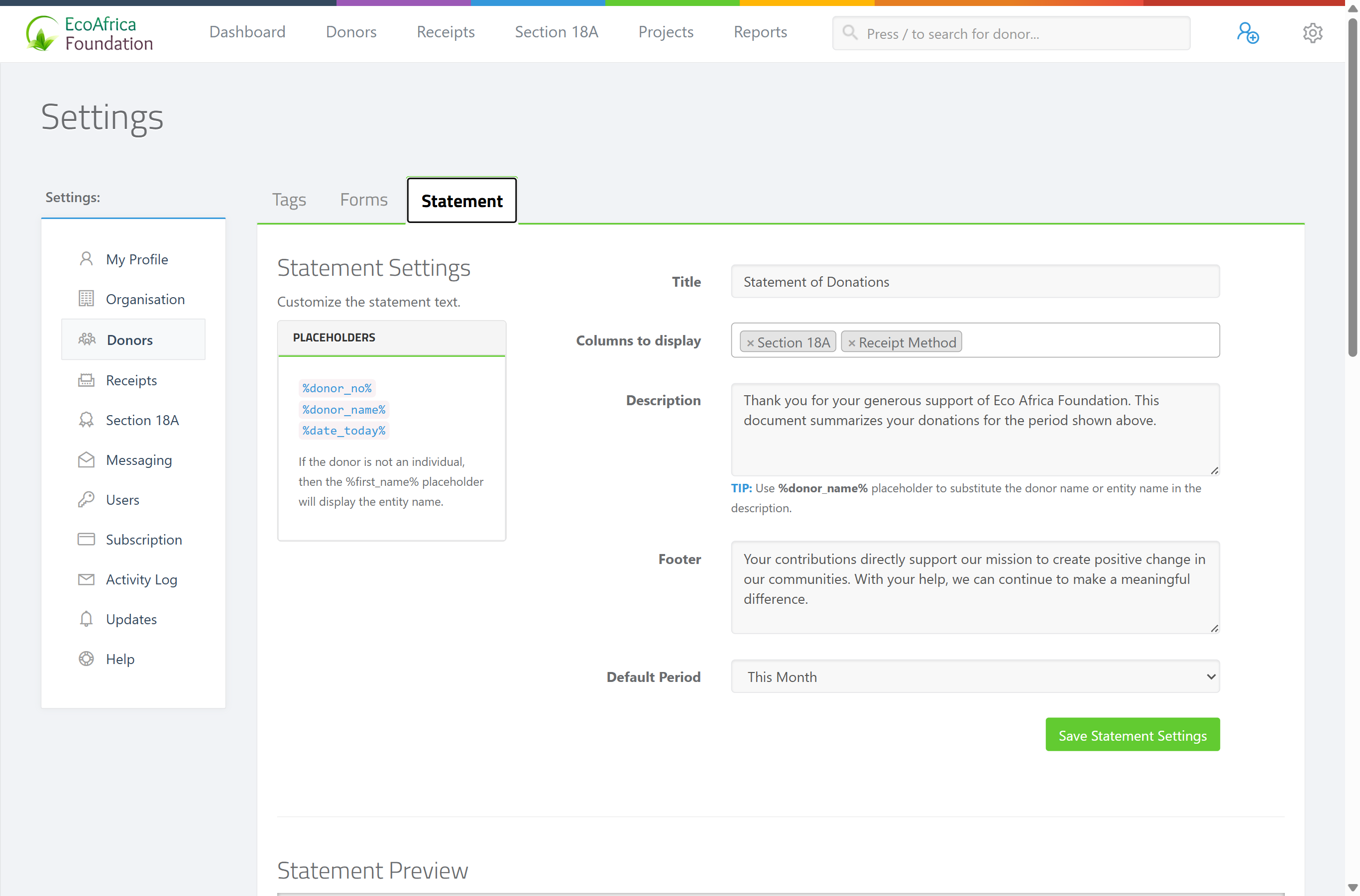
In short: Under donor settings → Statement settings, set the default title, table columns, description (with placeholders), footer and default period for every statement of donations. You can still tweak an individual statement when you make it.
Overview
Statement settings control the default wording, columns and period used when you produce a statement of donations — the summary letter of a donor's giving (not a tax certificate; see Statement of donations). Set these once and every statement you generate starts from them; you can still tweak an individual statement when you make it.
Before you start
- You need the Manage Settings permission.
- Statement settings live under donor settings, in the Statement settings section.
What you can set
- Title — the heading at the top of the statement (required).
- Columns to display — which optional columns appear in the donations table. The available columns are:
- Project
- Section 18A
- Receipt Type
- Receipt Method
(Each donation's date and amount always appear; these four are the optional extra columns.) - Description — the paragraph addressed to the donor. You can use placeholders ActiveDonor fills in automatically: - %donor_no% — the donor's number (zero-padded, e.g. 00042). - %donor_name% — the donor's full name. - %date_today% — today's date. - Footer — text printed at the bottom of the statement (optional). - Default Period — the date range a new statement opens with. The options are: - Last 30 Days - This Month - Last Month - Last 3 Months - Last 12 Months - This Year - Last Year
Setting it up
Step 1: Open Statement settings
Open donor settings and go to Statement settings.
Step 2: Fill in the defaults
Set the Title, tick the Columns to display, write the Description (using the placeholders if you want), add a Footer, and choose a Default Period.
Step 3: Save
Click Save Statement Settings. You see "Settings successfully saved".
Step 4: Preview (optional)
Open the statement preview to see how a statement will look with these settings.
Field reference
| Setting | Required? | Values / notes |
|---|---|---|
| Title | Yes | Heading at the top of the statement |
| Columns to display | At least one | Project, Section 18A, Receipt Type, Receipt Method |
| Description | No | Paragraph to the donor; supports %donor_no%, %donor_name%, %date_today% |
| Footer | No | Bottom-of-statement text |
| Default Period | No | Last 30 Days, This Month, Last Month, Last 3 Months, Last 12 Months, This Year, Last Year |
Common issues & solutions
| What you see | What it means | How to fix it |
|---|---|---|
Placeholders print literally (e.g. %donor_name%). |
The placeholder spelling is off. | Use the exact spellings: %donor_no%, %donor_name%, %date_today%. |
| A column I want is missing from the statement. | It isn't ticked. | Tick it under Columns to display and save. |
| A new statement opens on the wrong period. | The default period is set elsewhere. | Change the Default Period and save; you can also override the period on each individual statement. |
FAQ
Where do I set the standard wording for statements? Under donor settings → Statement settings — title, description, footer, columns and default period.
What placeholders can I use in the description?
%donor_no%, %donor_name% and %date_today% — they're filled in automatically when the statement is produced.
Can I still change a single statement? Yes — these are defaults. You can override title, description, footer and period on each individual statement.