Your subscription and plan
In short: Open Settings → Subscription (you need the Manage Billing permission) to see your usage and plan. Upgrade by picking a larger donor tier and paying by card or EFT. You can only move to a plan whose donor cap is above your current donor count. Paying and invoices are covered in Billing, invoices and payments.
Overview
A plan is the paid package that sets how many donors and how much file storage your charity can have, plus how often you're billed (monthly or annually). Your subscription is your workspace's current plan plus its renewal or expiry date and status. This article explains how to view your plan and usage, choose or change a plan, handle legacy plans and credit, cancel, and what happens if a subscription expires.
Before you start
You'll need:
- The Manage Billing permission. Without it the Subscription menu item doesn't appear.
- To open the page: in the top navigation bar, open the gear / cog dropdown and choose Settings, then select Subscription in the left-hand menu (you can also use the Subscribe item in the gear / cog dropdown).
📌 Note: All prices shown in ActiveDonor include VAT at 15%.
What the Subscription page shows
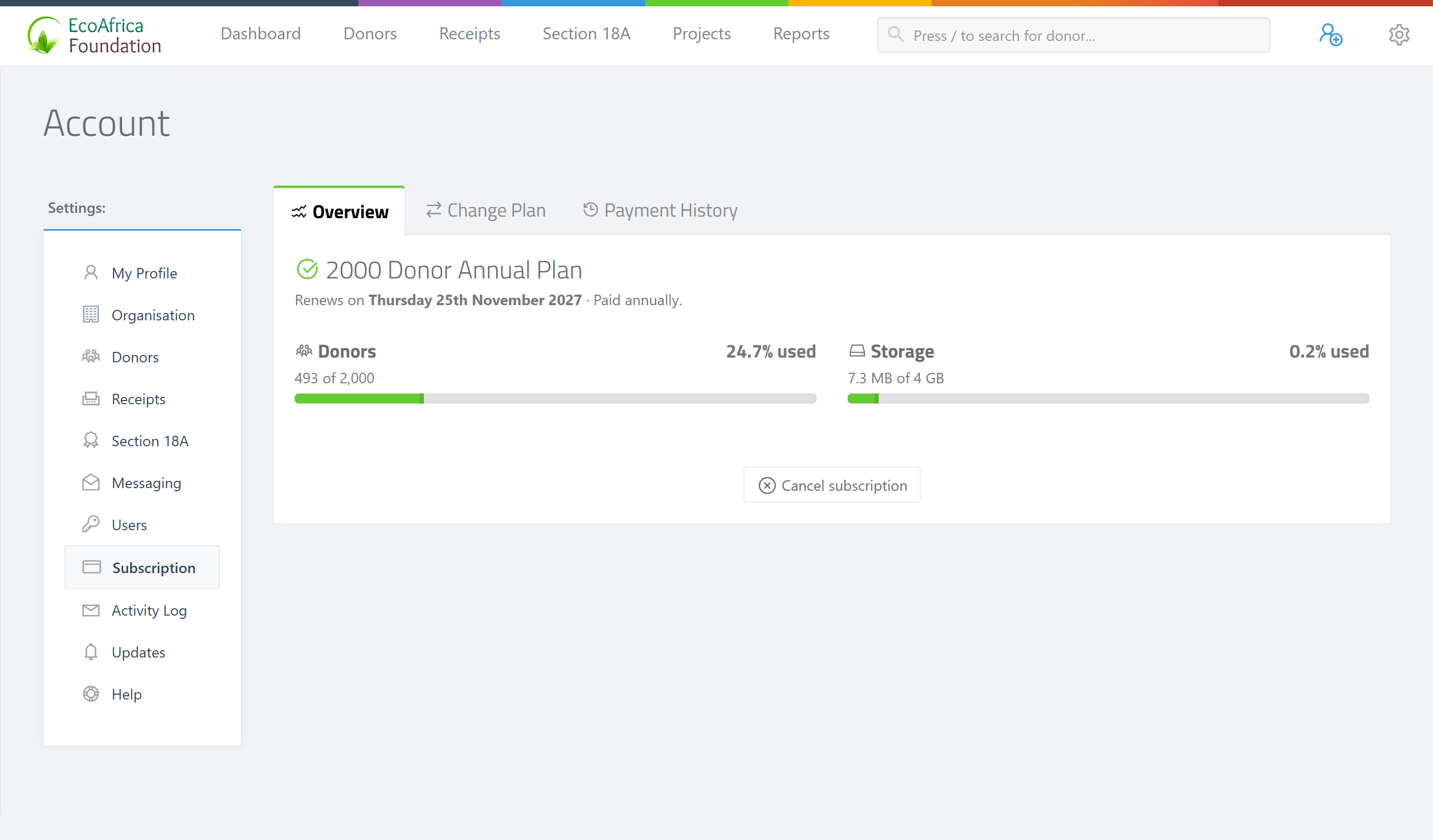
The page shows a row of usage widgets: Donors (used / cap), Projects, Users (used / cap) and Storage (used / limit in GB). The Donors and Storage bars turn red as you approach the limit (red at 90% or more). What appears below depends on whether you're on a trial or a paid plan.
On a free trial
If you're on the trial you see a yellow banner, Your ActiveDonor trial is running, with the expiry date ("Trial expires on …") and a Days remaining count. Beneath it is the plan picker (see Choosing a plan) so you can upgrade at any time before the trial ends.
On a paid plan
A paid plan shows a status badge and two tabs:
- A status badge at the top: 🟢 Active, 🔴 Cancelled, or 🟡 Expired. An active plan shows "Renews on {date}". A cancelled-but-still-active plan shows "Cancelled. Active until {date}".
- Subscription tab — the Manage Plan area with your current plan and the recommended upgrade (see Changing your plan), and the Cancel Subscription link.
- Billing History tab — a table of past payments (covered in Billing, invoices and payments).
If you have a Credit balance it appears as a small "Credit: R…" badge next to the status.
Legacy plans
Older packages are marked as legacy: the plan name carries a [LEGACY] marker and the page shows the note "Legacy plan — discontinued for new subscriptions. You continue to enjoy your current benefits." You keep your current benefits, but legacy plans are no longer offered to new subscribers. When you change plans from a legacy plan, the page invites you to "Select a Plan" from the current line-up rather than offering a same-tier match.
📌 Note: "Legacy platform must upgrade" usually means you're on a discontinued (legacy) plan. You can keep using it, but to move tiers you'll pick a current plan from the Manage Plan area and pay for it.
Choosing a plan (trial → paid)
On the trial plan picker you choose a billing period and a donor tier:
Step 1: Choose the billing period
Use the Monthly Billing / Annual Billing buttons. Annual is shown by default and carries a SAVE 2 MONTHS badge — paying annually costs ten months' worth instead of twelve.
Step 2: Pick the donor tier
Pick the tier that fits your donor count. The standard tiers are:
- Up to 500 Donors — R575 per month, or R5 750 per year. Marked MOST POPULAR.
- Up to 2 000 Donors — R1 150 per month, or R11 500 per year.
- Up to 5 000 Donors — R2 185 per month, or R21 850 per year.
Every paid tier includes unlimited receipts, unlimited Section 18A, advanced reports, the Android mobile app, and free updates & support.
Step 3: Pay
Click Pay by card to pay immediately, or (on annual) Email me an EFT invoice to be sent an invoice to pay by bank transfer. See Billing, invoices and payments for what happens next.
If your current donor count is higher than a tier's cap, that tier's Pay by card button is disabled with the tooltip "Your donor count exceeds this plan" — choose a larger tier.
Changing your plan (upgrading)
On a paid plan, the Subscription tab's Manage Plan area shows your Current Plan and a Recommended upgrade (the next tier above your donor count). Use the Monthly / Annual (Save 16.66%) toggle to switch billing period.
Step 1: Open Manage Plan
On the Subscription tab, look at the Manage Plan area. The recommended plan card is marked Recommended (or Select a Plan if you're on a legacy plan). Use View all plans to see every tier you can move to.
Step 2: Choose how to pay
- If you already have enough credit to cover the change, the card shows a Change Plan button — click it to switch immediately, with no new payment.
- If you don't have enough credit, the card shows Card Payment (and, for annual plans, EFT Payment) to pay the difference.
Notes on plan changes:
- You can only move to a plan whose donor cap is above your current donor count. Trying to move to one that's too small is refused with "Cannot change to this plan".
- If your credit is too low to cover the change, it's refused with "Insufficient credit balance to change plans."
- If you're already on the top tier, the area shows "You're on our best plan" and there's nothing higher to move to (contact support for custom limits).
- When you upgrade an annual plan part-way through its term, ActiveDonor works out a pro-rated credit for the unused portion of the old plan and records it as credit so you're not double-charged. (Monthly plans already align, so no proration applies.)
- A successful change shows "Your subscription has been updated."
Cancelling your subscription
Step 1: Cancel
On the Subscription tab, click Cancel Subscription (at the bottom) and confirm.
Step 2: Note the active-until date
The plan is marked 🔴 Cancelled but stays active until the end of the period you've already paid for — the status shows "Cancelled. Active until {date}". The confirmation reads "Your subscription has been cancelled."
Step 3: Reactivate if you change your mind
To reactivate before that date, choose a plan again from the Manage Plan area.
When a subscription expires
If a subscription's paid period ends and isn't renewed, the workspace is put on hold and users are redirected to a focused reactivation page (the /expired page) instead of the normal app. There's a short grace period (7 days by default) after the end date before the hard cut-off applies. The expired page is headed with an Account on hold badge and offers Pay by card (a "Pay R{amount} & reactivate" button) and Pay by EFT / bank transfer. See Billing, invoices and payments for how to reactivate.
💡 "Subscription expired but I have a debit order": A card or debit-order arrangement doesn't always renew the workspace automatically — if you're on the Account on hold page, reactivate from there (card is instant; EFT is reconciled by the ActiveDonor team). If you believe a debit order should have covered it, email [email protected] with your proof of payment. See Billing, invoices and payments.
Field reference
| Item | Meaning |
|---|---|
| Plan | The package that sets your donor cap, storage limit, billing period and price. |
| Subscription | Your workspace's current plan plus its renewal/expiry date and status (active, cancelled, expired). |
| Credit / credit balance | Money paid (or credited) that exceeds charges so far; applied automatically to your next invoice and can cover plan upgrades. |
| Donor cap | The maximum number of donors your plan allows (for example 500, 2 000, 5 000). |
| Storage limit | The maximum file storage your plan allows, shown in GB on the usage bar. |
| Invoice period | How often you're billed — monthly (1) or annually (12). |
| Legacy plan | A discontinued package (name marked [LEGACY]); existing users keep it but it's not sold to new subscribers. |
Common issues & solutions
| What you see | What it means | How to fix it |
|---|---|---|
| "Cannot change to this plan" | The plan you picked has a donor cap at or below your current donor count. | Choose a larger tier (one whose cap is above your donor count). |
| "Insufficient credit balance to change plans." | Your credit isn't enough to cover the new plan's charge. | Pay by Card Payment, or request an EFT Payment / EFT invoice instead. |
| A tier's Pay by card button is greyed out, tooltip "Your donor count exceeds this plan". | You have more donors than that tier allows. | Pick a larger tier. |
| "You're on our best plan" | You're already on the top tier; there's nothing higher to move to. | Contact ActiveDonor support if you need custom limits. |
| "Legacy plan — discontinued for new subscriptions. You continue to enjoy your current benefits." | You're on an older (legacy) package. | Keep using it, or pick a current plan from Manage Plan to move tiers. |
| You're taken to an Account on hold page and can't use the app. | Your subscription has expired. | Reactivate from that page by card (instant) or EFT; see Billing, invoices and payments. |
| You can't see the Subscription menu item. | You don't have the Manage Billing permission. | Ask a Super Admin to grant Manage Billing. See Roles and permissions. |
FAQ
How do I upgrade my plan / why does it say an upgrade is required? You've hit a plan limit (usually your donor cap or user limit) or a feature your tier doesn't include. Open Settings → Subscription, pick a larger tier in Manage Plan, and pay by card or EFT — see Why does it say "upgrade required", and how do I upgrade my plan? for the steps.
Which plan is the 500-donor option? Up to 500 Donors — R575 per month or R5 750 per year. It's marked MOST POPULAR.
Why can't I pick a smaller plan? You can only move to a plan whose donor cap is above your current donor count; smaller tiers are refused with "Cannot change to this plan".
My subscription expired but I have a debit order — what do I do? If you're on the Account on hold page, reactivate there (card is instant, EFT is reconciled manually). If a debit order should have renewed it, email proof of payment to [email protected].
What is a legacy plan? An older package that's no longer sold. You keep its benefits, but to change tiers you'll pick a current plan.
How do I cancel? On the Subscription tab click Cancel Subscription and confirm. It stays active until the end of the period you've paid for.
Do prices include VAT? Yes — all prices shown include VAT at 15%.
Related
- Why does it say "upgrade required", and how do I upgrade my plan?
- Billing, invoices and payments
- Managing users
- Roles and permissions
- Uploading and managing attachments
- Understanding your dashboard
Need a hand?
If you're not sure which plan you need or an upgrade won't go through, contact ActiveDonor support with your charity name and we'll sort it out.