Viewing all receipts for a donor
In short: Open the donor and go to their Receipts tab to see every donation they've given — amount, date, type, method, allocations and Section 18A status. You need the Manage Receipts and Manage Donors permissions.
Overview
Every donation a donor has given is listed on that donor's own page, so you can see their full giving history in one place — amounts, dates, receipt types and methods, project allocations, and whether a Section 18A certificate was issued for each. This article explains how to find and read a donor's receipts.
Before you start
You'll need:
- The Manage Receipts permission to see a donor's receipts.
- The Manage Donors permission to open the donor's page.
Viewing a donor's receipts
Step 1: Open the donor
Click Donors in the top navigation bar and select the donor, or use the search box at the top of the screen.
Step 2: Open the Receipts tab
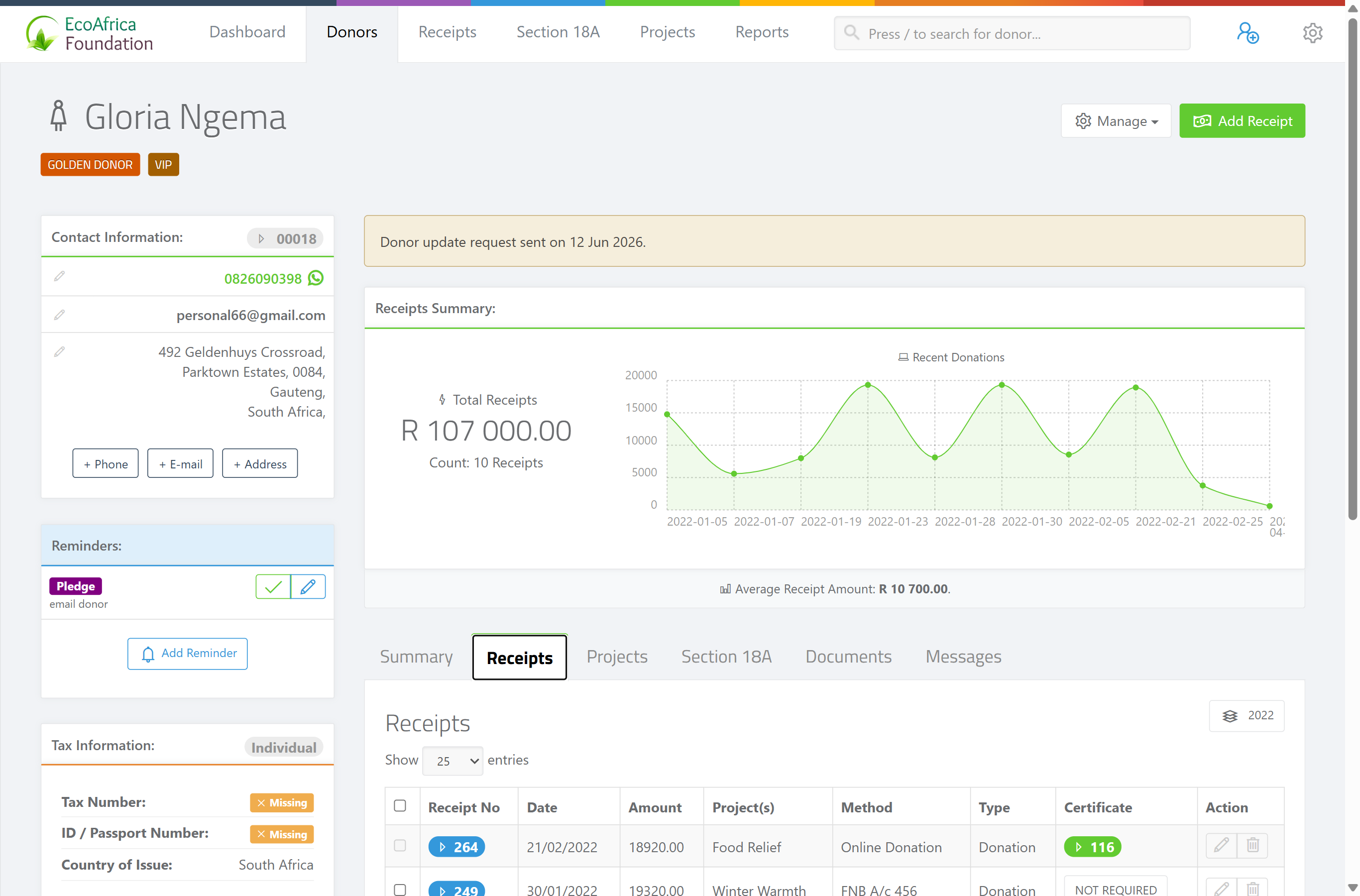
On the donor's page, open the Receipts tab/section. This shows a table of all that donor's receipts.
Step 3: Read the columns
Each row shows the receipt's date, amount, receipt type, receipt method, project allocation(s), and the Section 18A certificate status.
Step 4: Open a receipt
Click a receipt to open it in a pop-up, where you can edit, void, email, download or print it. See Printing, downloading and emailing a receipt and Editing or deleting a receipt.
Adding a receipt for this donor
From the donor's page you can capture a new receipt with the donor already selected — handy so you don't have to search for them again. The receipt is created the same way as anywhere else; see Creating a receipt.
Voided receipts
Receipts that have been voided (revoked) are flagged in the list. They remain on the record for audit purposes but no longer count as active donations.
FAQ
Where do I see everything one donor has given? On the donor's page, open the Receipts tab. It lists every receipt with date, amount, type, method, allocations and Section 18A status.
Can I add a receipt straight from the donor's page? Yes — capture it from the donor's page and the donor is already selected, so you don't have to search. See Creating a receipt.
Do voided receipts still show on the donor? Yes, they're flagged as revoked and kept for audit, but they don't count as active donations.