Donors report
In short: Open Reports, then Donor list under the Donors panel. The report lists your donors with their contact details and giving totals, with filters to segment the list and a detailed Excel export. The page is titled Donors Report. You need the View Reports permission.
Overview
The Donors Report is your donor list with giving totals. The page is titled Donors Report. Filter by when donors last gave, their type, location and contact details, then download a full 26-column spreadsheet for mail merges, postal mailings or importing donor data elsewhere.
Before you start
You'll need:
- The View Reports permission.
Running the report
Step 1: Open the report
Open Reports from the main navigation, then click Donor list in the Donors panel.
Step 2: Set filters and submit
Apply any sidebar filters (see Field reference) and submit.
Step 3: Export if needed
To download the full donor list as a spreadsheet, click the Excel Export button above the table. The file downloads as ad_donor_report_<date>.xlsx.
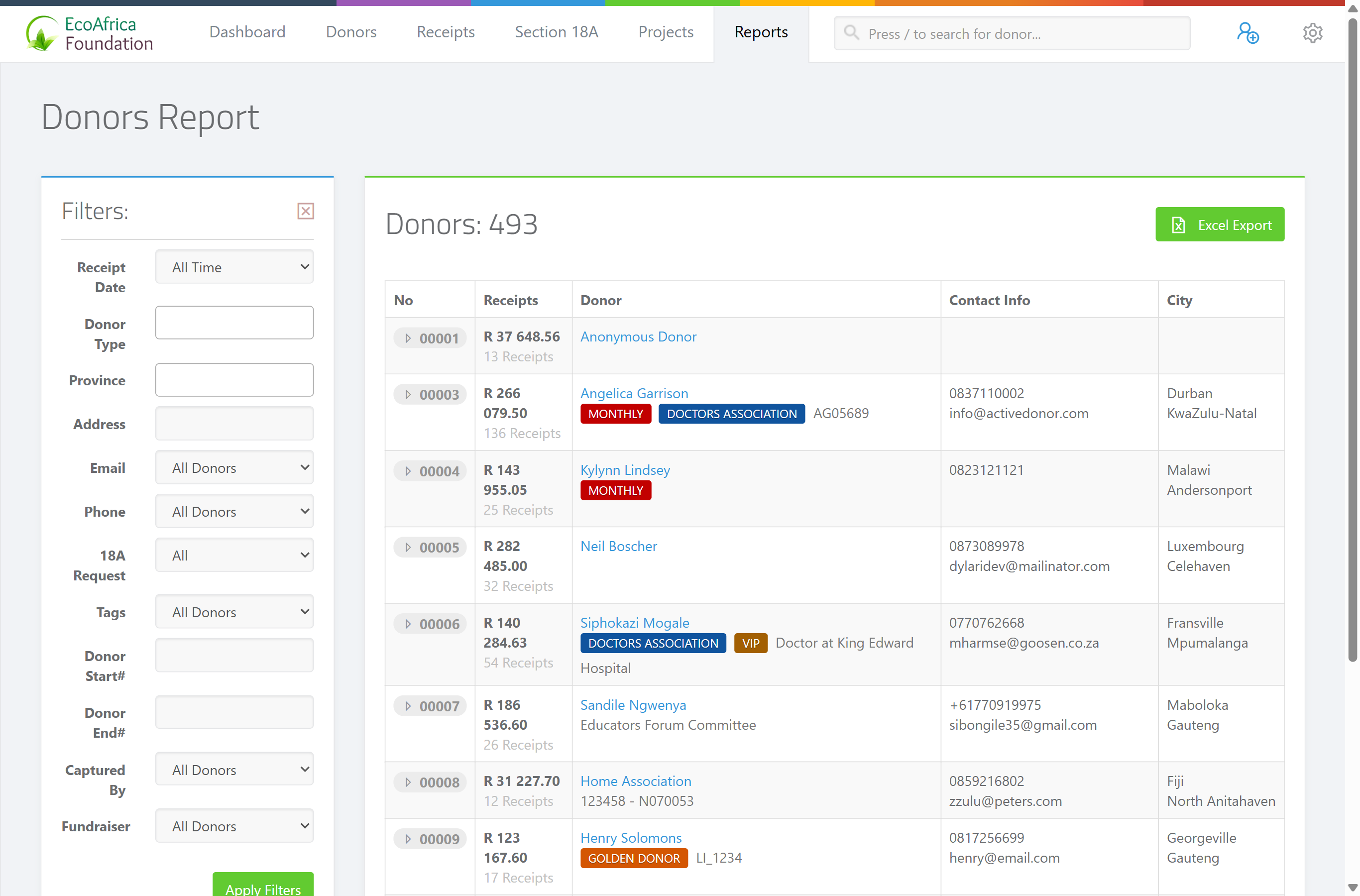
The results table (on screen)
One row per donor, with these columns:
- No — the donor's ID number.
- Receipts — the donor's total receipts and giving.
- Donor — the donor's name and tags.
- Contact Info — phone and email.
- City — the donor's city.
If nothing matches, the page shows: "🧐 No donors found."
The Excel export columns
The Excel export is far more detailed than the on-screen table. It contains 26 columns, in this order:
ID, Receipts, Total, Type, Title, Donor, Reference, Category, Language, Phone, Landline, Fax, Address, Address 1, Address 2, City, Province, Post Code, Country, Contact, Contact Cellphone, Contact Email, Contact Role, Require certificate, Created By, Created On.
This makes the export useful for mail merges, postal mailings and importing donor data elsewhere.
Field reference
| Filter | Values |
|---|---|
| Receipt Date | "This month", "Last month", "Last 30 days", "Last 3 months", "Last 6 months", "Last 12 months", "Year to date" or "All time" (default). Filters donors by when they last received a receipt. |
| Donor Type | Individual, Company, Company (Public), CC, NPC, Trust, Association, Estate, plus "Entity" (any non-individual type). |
| Province | Filter by the donor's province. |
| Address | Filter by address text. |
| "All", "Available" (has an email) or "Unavailable" (no email). | |
| Phone | "All", "Available" or "Unavailable". |
| 18A Request | Whether the donor has requested a Section 18A certificate. |
| Tags | "All", "Untagged", or specific tags. |
| Donor Start# | First donor ID in a range. |
| Donor End# | Last donor ID in a range. |
| Captured By | The user who captured the donor. |
| Fundraiser | The fundraiser linked to the donor. |
Common issues & solutions
| What you see | What it means | How to fix it |
|---|---|---|
| "🧐 No donors found." | No donors matched the filters. | Clear some filters, or set Receipt Date back to "All time". |
| The export has fewer columns than expected. | You're looking at the on-screen table (5 columns), not the Excel export (26 columns). | Click Excel Export for the full set of columns. |
| The Excel export hovers/spins and won't download. | The export is still building (large lists take longer), or the page lost its connection. | Wait a few seconds; if it doesn't finish, refresh and try again. If it keeps failing, contact support. |
FAQ
How do I export my full donor list with addresses for a mail merge?
Open Donor list, set your filters, then click Excel Export. The 26-column file (ad_donor_report_<date>.xlsx) includes address, contact and giving fields.
How do I find donors who haven't given recently? Use the Receipt Date filter (for example "Last 12 months") to scope by when donors last received a receipt. For lapsed-donor analysis, see LYBUNT (lapsed donors) report.
How do I see donors without an email or phone? Set the Email or Phone filter to "Unavailable".
Can I filter by donor type? Yes — use Donor Type. The "Entity" option covers any non-individual organisation type.